

An invoice arrives, and several business partner records look plausible. The master record uses an abbreviation; the document spells out the name. A regional address differs from the head office. There is also a company with an almost identical name. The comparison work begins: opening older invoices, checking details and investigating connections. Creating another record would only leave the question for the next invoice.
The documents often hold the decisive clues
Similar names can belong to different companies. Different names can describe the same supplier. And a regional location may need its own record even though it belongs to a known company. Cleaning up these cases means avoiding both unnecessary duplicate records and incorrect consolidations.
New invoices: assignment runs automatically
New documents are automatically assigned to business partners in Cube during invoice intake. When the initial comparison finds no suitable match despite similar existing records, the configured AI check can use the document to resolve the assignment. Its result feeds directly into the assignment: use an existing business partner, link a new branch or create an independent business partner in Cube.
When invoice issuer details look inconsistent, an AI agent can additionally examine the document and consult further business partner information. This check runs automatically within the processing configured for it. Your accounts payable team does not need to start a separate business partner analysis. If the additional AI check is unavailable or produces no usable answer, Cube continues with its regular assignment using the extracted details.
Existing duplicates: review and apply cleanup
Business partner analysis complements this ongoing assignment. It examines potential duplicates in existing Cube records using business partner data and documents, and prepares concrete cleanup proposals: which records could be consolidated, which branches should be linked and which companies should be treated independently.
The review area shows the proposed changes, the associated documents and the AI agent’s recorded reasons. This gives you a focused way to examine the basis for a proposal. Analysis and applying changes are separate steps.
Four similar records, three different decisions
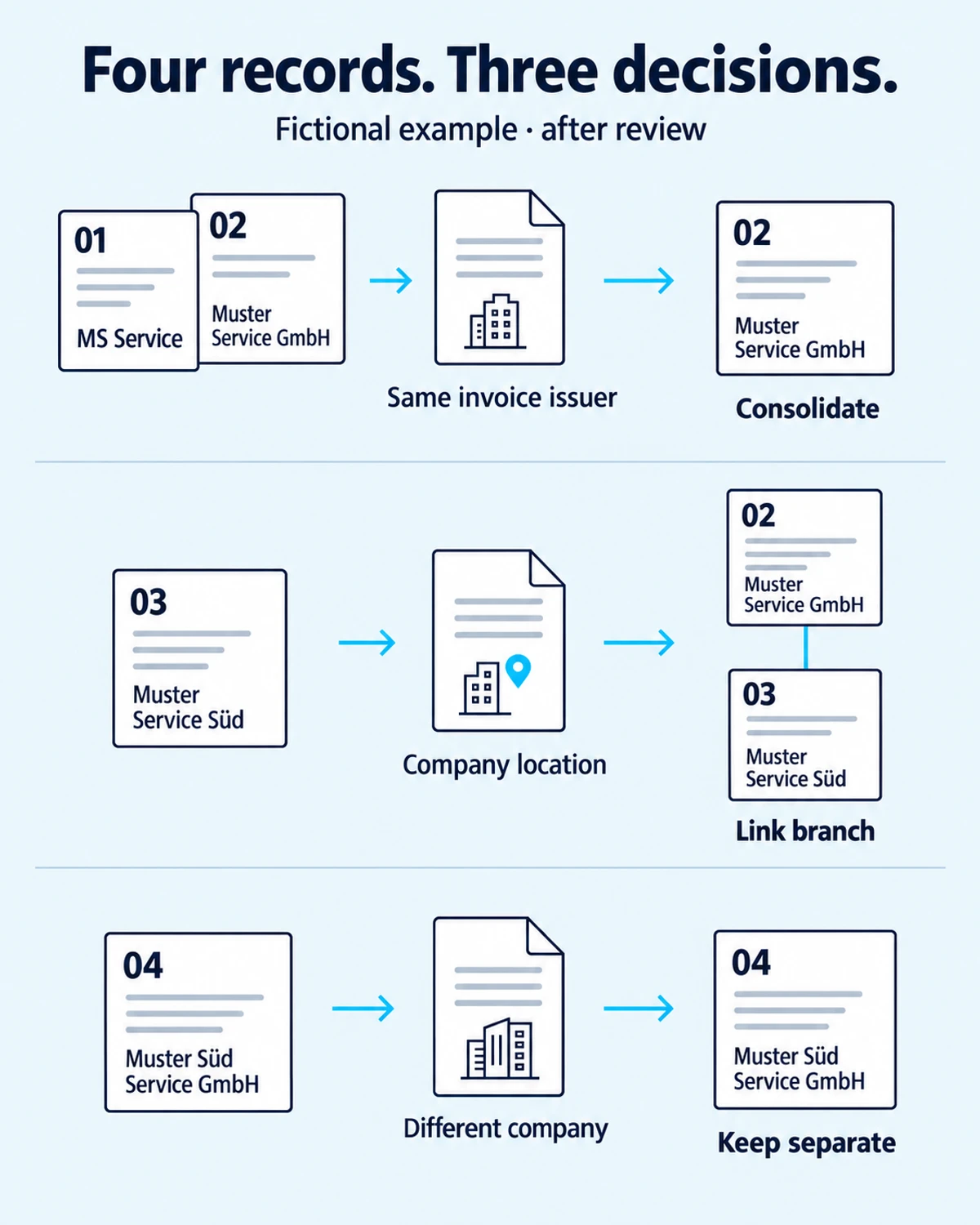
A simplified fictional example illustrates the distinction. The records contain “MS Service” (01), “Muster Service GmbH” (02), “Muster Service Süd” (03) and “Muster Süd Service GmbH” (04). These names alone are not enough to decide on cleanup. Suppose the associated documents and other details confirm the following relationships after review:
- Consolidate 01 and 02: the abbreviation and the full name refer to the same invoice issuer. The review confirms an unnecessary duplicate; there is no need to keep these records separate.
- Link 03 as a branch: the documents identify the regional location as part of Muster Service GmbH. The location retains its own record and is linked to the company.
- Keep 04 independent: the similarly named Muster Süd Service GmbH is a different company. Its record remains separate. A similar name is no reason to consolidate it with the others.
From a reviewed proposal to a change in Cube
You decide which cleanup of existing records to apply. For confirmed consolidations, Cube assigns linked documents and data to the retained record. Useful branch structures remain intact. Automatic assignment of new documents and targeted cleanup of accumulated records therefore work together. Bring a supplier case that regularly sends your team searching. We will show you, using your documents, how Cube supports assignment and cleanup.
Examine your difficult supplier case with Cube →