
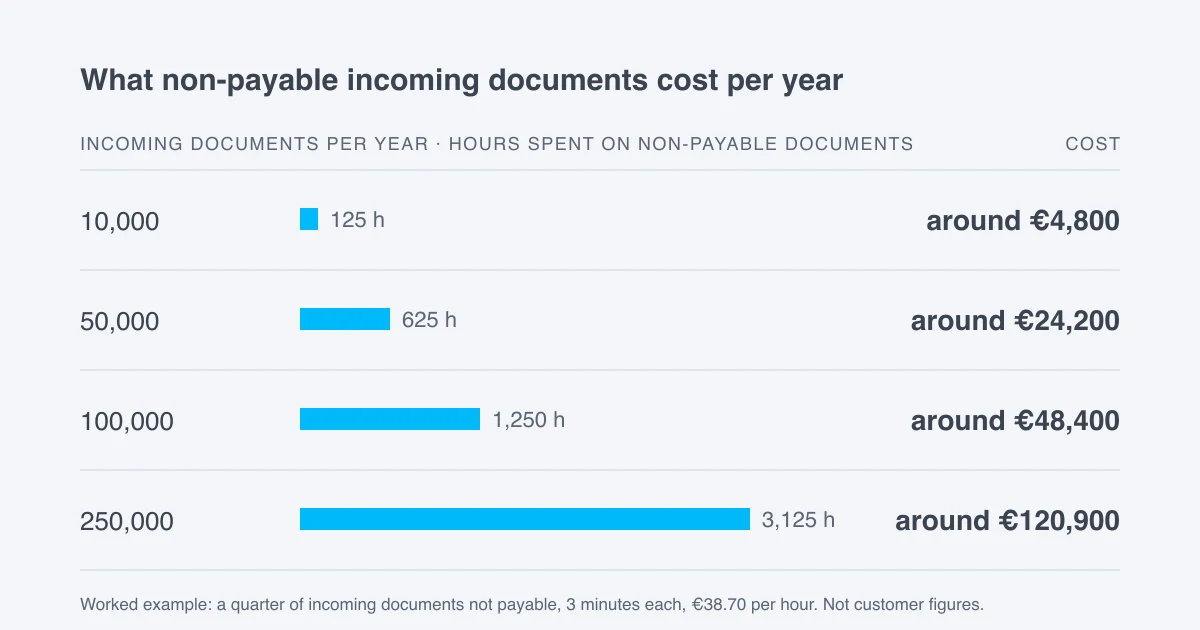
In our experience, roughly one incoming document in four in accounts payable is not a payable invoice. If sorting each one takes three minutes, then at 10,000 incoming documents a year, that is around 125 hours and €4,800; at 100,000, around 1,250 hours and €48,400. Pridonu Cube checks these documents before they go to your ERP system.
Invoice intake receives more than what needs paying. A reminder about an invoice that is already in approval. The same invoice a second time because the supplier is chasing it. A cover letter or a proof of service without an invoice. Someone opens each of these documents, reads it, classifies it and files it or sends it back. None of it is posted.
How is the worked example calculated?
The share of one in four reflects our experience of invoice intake. In your intake it may be higher or lower. The hourly rate of €38.70 rests on an annual salary of €51,000 in accounts payable, 29% employer on-costs and 1,700 working hours a year. At 10,000 incoming documents, a quarter is 2,500 non-payable documents; at three minutes each, that is 125 hours. At 100,000, it is 25,000 non-payable documents and 1,250 hours.
This does not include the cost of a document that slips through: an invoice paid twice, or a reminder noticed too late. And the three minutes are spent where staff are already in short supply.
What does Cube check before the ERP system sees anything?
We set up with you which rules apply. Cube assigns the documents in each intake to a document type set up for your company. Depending on the settings, Cube attaches cover letters, quotations or proofs of service without an invoice to the matching invoice or asks a person to assign them.
Below the dunning level you set, Cube holds a reminder back unless an exception rule applies. If Cube identifies from your connected posting data that all reminded invoices are already posted, it also holds the reminder back.
If holding duplicates is set up, Cube can hold a case back because of an identical file or the same invoice number from the same supplier. If the file differs, the AI can compare both documents and tell whether the invoice was resent or corrected.
Duplicates and reminders held back appear with their reason in the clearing cockpit. A reply to the sender can be sent from the case with a text template.
Does Cube save all the time in the worked example?
No. What Cube holds back appears in the clearing cockpit, and some of it still needs a decision. What goes away is finding and classifying these documents in the intake. How much that amounts to for you, a trial with your own emails will show.
Can Cube hold back an urgent reminder?
Yes, that is possible: if Cube detects it as a duplicate, or if Cube does not recognise it as a debt collection letter or a notice of supply suspension or enforcement and the minimum level applies. It then appears with its reason in the clearing cockpit.
What happens if the AI check of a duplicate fails?
The duplicate match then stays open and the case stays held back until the match is resolved.
Run the numbers with your own figures
Whether it is one document in four or one in six, your own intake will show. For a trial you receive your own mailbox and forward emails just as they arrive today. You see what share of your incoming documents is not a payable invoice.
Try Cube with your own invoice intake →Nikolai Panasenko, Managing Director of Pridonu GmbH